wSS2008!
Tuesday, November 17, 2009
Thursday, October 22, 2009
Force Safari to open target links in new tab rather than window
forras: osxdaily.com
ou can force Safari to open target = “_blank” links into new tabs rather than new windows by opening the Terminal and typing the following command:
defaults write com.apple.Safari TargetedClicksCreateTabs -bool true
Then restart Safari and from here on anytime you click a link targeted as _blank it will open in a new tab.
You can reverse this behavior and go back to the default new windows instead by typing:
defaults write com.apple.Safari TargetedClicksCreateTabs -bool false

Friday, October 09, 2009
iPhoney - iPhone Safari simulator
Looking for a way to see how your web creations will look on iPhone? Look no further. iPhoney gives you a pixel-accurate web browsing environment—powered by Safari—that you can use when developing web sites for iPhone. It's the perfect 320 by 480-pixel canvas for your iPhone development. And it's free.
Friday, October 02, 2009
Mac OS Quick Look-nal a "rontgenezes" be/ki kapcsolasa
be:
defaults write com.apple.Finder QLEnableXRayFolders 1
ki:
defaults write com.apple.Finder QLEnableXRayFolders 0
Mac OS Enable native NTFS read/write support
Itt van az eredeti, de kommentek kozott vannak ketkedok
- In Terminal, type diskutil info /Volumes/volume_name, where volume_name is the name of the NTFS volume. From the output, copy the Volume UUID value to the clipboard.
- Back up /etc/fstab if you have it; it shouldn't be there in a default install.
- Type sudo nano /etc/fstab.
- In the editor, type UUID=, then paste the UUID number you copied from the clipboard. Type a Space, then type none ntfs rw. The final line should look like this: UUID=123-456-789 none ntfs rw, where 123-456-789 is the UUID you copied in the first step.
- Repeat the above steps for any other NTFS drives/partitions you have.
- Save the file and quit nano (Control-X, Y, Enter), then restart your system.
Wednesday, September 30, 2009
Mac OS switch user
Csak mert mindig elfelejetem:
System Preferences / Accounts / Login Options / Show fast user swtiching menu
Sunday, September 27, 2009
Wednesday, August 12, 2009
Mac OS setfile utility
osxdaily.com:
Make a file or folder invisible in Mac OS X Finder
setfile -a V testfile.txt
Poof! Like magic, the file or folder is no longer visible via the Finder GUI, but don’t worry your files are still there and you can find them via the command line and will show with an ls command. If you want to make your files and folders visible again, use this command:
Make a file folder visible again in Mac OS X Finder
setfile -a v testfile.txt
+++++++++++++++++++++++++++++
/Developer/Tools/SetFile is a tool to set the file attributes on files in an HFS+ directory. It attempts to be similar to the setfile command in MPW. It can apply rules to more than one file with the options applying to all files listed.
Monday, August 10, 2009
Mac OS Print Screen
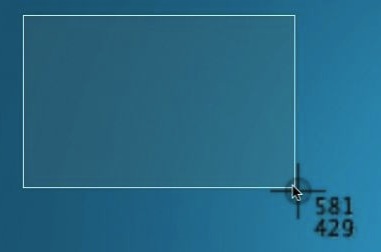
Apple key + Shift + 4
Utana ki lehet jelolni amirol kepet akarunk. Amint befejeztuk a kijelolest elkeszul egy png a desktop-ra.
Ha nem jelolunk ki, hanem leutjuk a space-t, akkor kamera lesz a kurzorbol es amelyik ablakra kattintunk arrol kapunk egy kepet a desktop-on.
Tovabba:
Tovabba:
1: Create & Set a Designated Screen Shot Folder
Tired of screen shots cluttering the desktop? Me too, and the solution is simple: make a designated folder for screenshots to appear into and then set that as the new default screen shot location. I recommend making a subfolder in the ~/Pictures/ directory named “Screenshots”, then use the following defaults command to set that as the new save location for all screenshots:
defaults write com.apple.screencapture location ~/Pictures/Screenshots/
Follow that up with a restart of SystemUIServer for changes to take effect:
killall SystemUIServer
Test it out by taking a screen shot, it’ll now save directly to the Screenshots folder instead of the desktop.
2: Change the Screen Shot Image File Format
PNG files are typically large and bloated and not the most web-friendly, if your screenshots are destined for the web you can dramatically reduce the file size and avoid the hassle of batch converting images by just changing the default screen shot file type to another image format:
defaults write com.apple.screencapture type jpg
And again, restart SystemUIServer for JPG to be set as the new file type:
killall SystemUIServer
Take a screenshot to confirm. You can also choose GIF, TIF, PDF, or return back to PNG if you want the default setting again. Pick the appropriate format for your needs and this can prevent you from having to batch convert a huge group of images after they’ve been taken.
3: Take Impossible Screen Shots with a Timer
Launch the Grab app found in /Applications/Utilities/ and you can take screen captures on a timer, letting you screenshot things that would otherwise be impossible, like some menu pulldowns, system events, and splash screens.
- From Grab, pull down the “Capture” menu and choose “Timed Screen”
The default Grab setting is 10 seconds, if you need to have a different time delay, use Terminal instead:
screencapture -T 3 osxdaily.jpg
Replace “3″ with how ever many seconds you want the timed delay to be.
4: Capture the Mouse Pointer or a Custom Cursor in Screen Captures
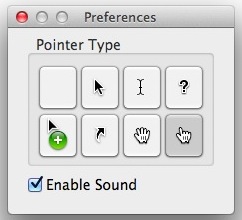
The aforementioned Grab app has a handy feature that lets you show the pointer in screenshots, and it’s actually customizable from a variety of pointer types. Here’s how to use it:
- In the Grab app, open “Preferences” and select the desired cursor type”
- Take a screen shot using Grab app to capture the mouse cursor
5: Move the Selection Area from the Original Position
Command+Shift+4 allows you to take a screenshot with a selection box, but have you ever wanted to move it around after you’ve drawn that selection box? You can.
- Hit Command+Shift+4 to draw the screen shot selection box as usual, then hit and hold Spacebar and click to drag the box
I’d never actually heard of this one before, but CultOfMac found this neat trick, cheers to them!
Friday, June 19, 2009
xsd:any element processContents attributuma
Olyan XSD-t kellett csinalnom ami egy szintig meghatarozza, hogyan nezzen ki az XML, de egy adott node alatt barmi lehetett. Erre volt jo az xsd:any
processContents
An indicator of how an application or XML processor should handle validation of XML documents against the elements specified by this any element. If no processContents attribute is specified, the default is strict. If processContents is specified, it must one of the following:
processContents
An indicator of how an application or XML processor should handle validation of XML documents against the elements specified by this any element. If no processContents attribute is specified, the default is strict. If processContents is specified, it must one of the following:
strict | The XML processor must obtain the schema for the required namespaces and validate any element from those namespaces. |
| lax | The XML processor attempts to obtain the schema for the required namespaces and validate any element from those namespaces; however, if the schema cannot be obtained, no errors will occur. |
| skip | The XML processor does not attempt to validate any elements from the specified namespaces. |
Friday, March 27, 2009
Microsoft AppLocale
Unicode based platforms, such as Windows XP, emulate the language environment required to run non-Unicode applications by internally converting application's non-Unicode text data to Unicode using a system-wide variable commonly called the system local (or language for non-Unicode applications). The language of the non-Unicode applications should be of the same script or family as the one defined by the system locale. Failing to meet this condition results in display of garbage characters in the UI of the application.
- Only an administrator has the ability of setting the system locale value.
- Setting the system locale requires a system reboot.
- Only one system locale can be set at a time.
AppLocale (or Application Locale) is a temporary solution to these limitations caused by non-Unicode applications running on the Unicode (UTF-16) based Windows XP. AppLocale detects the language of the legacy application and simulates a corresponding system locale for code-page to/from Unicode conversions.
++++++++++++++++
Ha batch file-bol futtatjuk akkor tudni kell a hexa language id-kat
pl: AppLoc.exe foo.exe /L0401 arab kornyezetben inditja a foo.exe-t
Thursday, March 12, 2009
Thursday, February 26, 2009
Ha nincs Wi-Fi
forras:
http://forum.speedshop.hu/index.php?automodule=blog&blogid=3&&req=printentry&eid=21
Ha nincs a közelben (pl. munkahelyen) WiFi HotSpot, de van egy laptop vagy egy PC WiFi adapterrel, akkor ebből tudunk Wi-Fi hálózatot készíteni az iPhone-unknak.
Alábbiak szerint működik a dolog.
Windows Vista-n
- Ellenőrizd, hogy az internet működik–e?
- Lépj be ide: Vezérlőpult / Hálózat és megosztási központ (network and sharing center)
- Balra a feladatok menüben klikkelj az új kapcsolat létrehozására
- Itt válaszd ki a vezeték nélküli ad hoc hálózatot (wireless ad hoc network)
- Adj nevet a hálózatnak és egy WEP kódot, ha nem akarod mindenkivel megosztani
- Kattints a "kapcsold be az internet kapcsolat megosztását" opcióra és kész.
Mac-en
- Ellenőrizd, hogy az internet működik–e?
- Rendszer tulajdonságok (system preferences), kattints a megosztásra (sharing)
- felül kattints az Internet gombra a kívánt oldalhoz
- válaszd ki, hogy honnan szeretnéd használni, neked a beépített ethernet kell (Built in –Ethernet)
- lent a kis ablakban pedig az AirPort –ot válaszd
- az opciók alatt tudsz nevet és kódot adni a hálózatnak
- klikkelj a start-ra és készen is van
Widows XP-n
- Ellenőrizd hogy az internet működik –e?
- vezérlőpult / hálozati kapcsolatok
- jobb klikk a vezeték nélküli kapcsolatokra (wireless connections) és kattints a tulajdonságokra (properties)
- először a vezeték nélküli hálózatok alatt (wireless networks) jelöld be azt az ablakot, hogy: használd a windows-t, hogy konfigurálja a vezeték nélküli hálózati beállításokat.
(Use windows to configure my wireless network settings)
- lent a kedvelt hálózatokban (preffered) kattints a hozzáadásra (add)
- adj nevet a hotspot-nak, aztán válaszd ki a megosztott (shared), majd a WEP opciót. Adj neki egy kódot, majd kattints az OK-ra.
- most klikk a további lehetőségekre és jelöld ki, hogy: csak gépről-gépre (ad hoc) hálózatok (computer-computer (ad hoc) networks only)
- itt minden befejezve, kattints az OK-ra mindenhol
- most jobb klikk a helyi hálózati kapcsolatokra és klikk a tulajdonságokra (properties)
- a legtetején van egy speciális (advanced) lapfül
- internet kapcsolat megosztás (internet connection sharing)
- jelöld be az első beallítást, de vigyázz arra, hogy a második ne legyen bejelölve.
- OK mindenhol és kész is van
Előfordulhat hogy a BIOS-ban be van jelölve, hogy ne használjon WiFi-t, ha van aktív kábeles internet, akkor ezt ki kell kapcsolni, hogy működjön!
http://forum.speedshop.hu/index.php?automodule=blog&blogid=3&&req=printentry&eid=21
Ha nincs a közelben (pl. munkahelyen) WiFi HotSpot, de van egy laptop vagy egy PC WiFi adapterrel, akkor ebből tudunk Wi-Fi hálózatot készíteni az iPhone-unknak.
Alábbiak szerint működik a dolog.
Windows Vista-n
- Ellenőrizd, hogy az internet működik–e?
- Lépj be ide: Vezérlőpult / Hálózat és megosztási központ (network and sharing center)
- Balra a feladatok menüben klikkelj az új kapcsolat létrehozására
- Itt válaszd ki a vezeték nélküli ad hoc hálózatot (wireless ad hoc network)
- Adj nevet a hálózatnak és egy WEP kódot, ha nem akarod mindenkivel megosztani
- Kattints a "kapcsold be az internet kapcsolat megosztását" opcióra és kész.
Mac-en
- Ellenőrizd, hogy az internet működik–e?
- Rendszer tulajdonságok (system preferences), kattints a megosztásra (sharing)
- felül kattints az Internet gombra a kívánt oldalhoz
- válaszd ki, hogy honnan szeretnéd használni, neked a beépített ethernet kell (Built in –Ethernet)
- lent a kis ablakban pedig az AirPort –ot válaszd
- az opciók alatt tudsz nevet és kódot adni a hálózatnak
- klikkelj a start-ra és készen is van
Widows XP-n
- Ellenőrizd hogy az internet működik –e?
- vezérlőpult / hálozati kapcsolatok
- jobb klikk a vezeték nélküli kapcsolatokra (wireless connections) és kattints a tulajdonságokra (properties)
- először a vezeték nélküli hálózatok alatt (wireless networks) jelöld be azt az ablakot, hogy: használd a windows-t, hogy konfigurálja a vezeték nélküli hálózati beállításokat.
(Use windows to configure my wireless network settings)
- lent a kedvelt hálózatokban (preffered) kattints a hozzáadásra (add)
- adj nevet a hotspot-nak, aztán válaszd ki a megosztott (shared), majd a WEP opciót. Adj neki egy kódot, majd kattints az OK-ra.
- most klikk a további lehetőségekre és jelöld ki, hogy: csak gépről-gépre (ad hoc) hálózatok (computer-computer (ad hoc) networks only)
- itt minden befejezve, kattints az OK-ra mindenhol
- most jobb klikk a helyi hálózati kapcsolatokra és klikk a tulajdonságokra (properties)
- a legtetején van egy speciális (advanced) lapfül
- internet kapcsolat megosztás (internet connection sharing)
- jelöld be az első beallítást, de vigyázz arra, hogy a második ne legyen bejelölve.
- OK mindenhol és kész is van
Előfordulhat hogy a BIOS-ban be van jelölve, hogy ne használjon WiFi-t, ha van aktív kábeles internet, akkor ezt ki kell kapcsolni, hogy működjön!
Friday, February 13, 2009
Balássy György: Nagy méretű weblapok fotózása – Webpage Capture
"Akinek kellett már dokumentálás vagy UI prototípus egyeztetés céljából weblapról képernyőképet készítenie, az tudja, hogy a feladat nem minden esetben egyszerű. Akkor nincs gond, ha az oldal kifér a képernyőre, de mi van akkor, ha függőlegesen csak három képernyőnyi scrollozás után lehet az oldal aljára érni?...
...kénytelen voltam írni egy célalkalmazást"
...kénytelen voltam írni egy célalkalmazást"
Tuesday, February 03, 2009
VIDEO_TS to iso to DVD on Mac OS
VIDEO_TS > iso:
After searching the forums and trying various things, I still couldn't find a quick, reliable, free method of burning a VIDEO_TS folder to a pure UDF DVD, so that it would play in regular DVD players, as well trigger DVD Player to start up automatically. Anyway, as often is the case, Terminal had the answers. Just type in this command and change the paths to suit:
iso to DVD:
After searching the forums and trying various things, I still couldn't find a quick, reliable, free method of burning a VIDEO_TS folder to a pure UDF DVD, so that it would play in regular DVD players, as well trigger DVD Player to start up automatically. Anyway, as often is the case, Terminal had the answers. Just type in this command and change the paths to suit:
hdiutil makehybrid -udf -udf-volume-name DVD_NAME \
-o MY_DVD.iso /path/to/VIDEO_TS/parent/folderiso to DVD:
- Insert a blank disc.
- Start Disk Utility.
- From the File menu, choose Open Disk Image and select the ISO to be burned.
- In the list of volumes, you will now see an item representing the ISO file. Select it.
- Click the Burn button and follow the instructions.
Thursday, January 22, 2009
Avi file-ok osszecsatolasa
Kaptam 3 file-t (xy.001, xy.002, xy.003) ami egy avi file feldarabolasa volt. Mac OS-en kellett osszecsatolni amire az AJoiner-t hasznaltam.
Wednesday, November 19, 2008
Fiddler Web Debugging Proxy
Fiddler is a HTTP Debugging Proxy which logs all HTTP traffic between your computer and the Internet. Fiddler allows you to inspect all HTTP Traffic, set breakpoints, and "fiddle" with incoming or outgoing data. Fiddler includes a powerful event-based scripting subsystem, and can be extended using any .NET language.
Fiddler is freeware and can debug traffic from virtually any application, including Internet Explorer, Mozilla Firefox, Opera, and thousands more.
Tuesday, November 11, 2008
complete website validation
Scan your entire site for validation errors and dead links manage multiple sites, watch report status in real time receive report email notifications... completely free!
Friday, September 12, 2008
WSE 2.0 wse910 timetoleranceinseconds
WSE 2.0-ban keszult a szerver amit hasznalnunk kellett es belefutottunk, hogy a client es a server kozott nagyobb volt az idokulonbseg mint 5 perc. Jott is a wse910-es hiba. Megneztuk es kidrult, hogy nem volt beallitva a timetoleranceinseconds es haverjai. Onmagaban ezzel se jutottunk tovabb ezert ugy oldottuk meg, hogy a kliensen atallitottuk az idot. Ezt a WSE 2.0-t el kell kerulni.
Wednesday, August 27, 2008
ListViewItem.UseItemStyleForSubItems Property
ListView control-ban kellett felvennem sorokat ahol az egyik oszop szinet kulon-kulon kellett allitanom soronkent.
Igy problalkoztam:
string[] data = { "first", "second", "third" };
ListViewItem lwi = new ListViewItem(data);
lwi.SubItems[1].ForeColor = Color.Red;
lvMyListView.Items.Add(lwi);
Igy nem valtozott meg a 2. oszlop szine, mert ez kimaradt:
lwi.UseItemStyleForSubItems = false;
Igy teljes:
string[] data = { "first", "second", "third" };
ListViewItem lwi = new ListViewItem(data);
lwi.UseItemStyleForSubItems = false;
lwi.SubItems[1].ForeColor = Color.Red;
lvMyListView.Items.Add(lwi);
MSDN-ben
Igy problalkoztam:
string[] data = { "first", "second", "third" };
ListViewItem lwi = new ListViewItem(data);
lwi.SubItems[1].ForeColor = Color.Red;
lvMyListView.Items.Add(lwi);
Igy nem valtozott meg a 2. oszlop szine, mert ez kimaradt:
lwi.UseItemStyleForSubItems = false;
Igy teljes:
string[] data = { "first", "second", "third" };
ListViewItem lwi = new ListViewItem(data);
lwi.UseItemStyleForSubItems = false;
lwi.SubItems[1].ForeColor = Color.Red;
lvMyListView.Items.Add(lwi);
MSDN-ben
Saturday, May 31, 2008
Tuesday, May 27, 2008
SOP - Same origin policy
The philosophy of the same origin policy is simple: the browser should not trust content loaded from arbitrary websites. Web pages run within the sandbox and are prevented from accessing resources from other origins. Without this protection, a malicious web page could compromise the confidentiality or integrity of another web page.
The term "origin" is defined using the domain name, protocol and port. Two pages belong to the same origin if and only if these three values are the same.
The term "origin" is defined using the domain name, protocol and port. Two pages belong to the same origin if and only if these three values are the same.
Douglas Crockford: Durable Objects
Fortunately, JavaScript provides the means to construct durable objects that can perfectly guard their state by using a variation of the Module Pattern.
...
By adding one simple rule, we can easily generate secure objects:
A durable object contains no visible data members, and its methods use neither this nor that.
...
By adding one simple rule, we can easily generate secure objects:
A durable object contains no visible data members, and its methods use neither this nor that.
This is a template for a durable constructor:
function durable(parameters) {
var that = {} or the product of another durable constructor;
var private variables;
function method() {
…
}
that.method = method;
return that;
}
Define all of your methods as private methods. The methods you choose to expose to the public get copied into that. None of the functions defined or inherited make use of that or this.
...
Durable objects allow code from multiple (possibly untrusted) parties to
cooperate. Durable objects can be expressed in a safe subset of JavaScript,
such as ADsafe or Cajita.
Tuesday, May 20, 2008
2 cikk az olvashato URL-ek kesziteserol
A PHP-s megoldas:
Till Quack: How to Succeed With URLs
A regex megoldas:
Bill Humphries: URLS! URLS! URLS!
Till Quack: How to Succeed With URLs
A regex megoldas:
Bill Humphries: URLS! URLS! URLS!
Sunday, April 20, 2008
CSS Reset
Eric Meyer: The goal of a reset stylesheet is to reduce browser inconsistencies in things like default line heights, margins and font sizes of headings, and so on.
YUI Reset CSS: The foundational YUI Reset CSS file removes and neutralizes the inconsistent default styling of HTML elements, creating a level playing field across A-grade browsers and providing a sound foundation upon which you can explicitly declare your intentions.
YUI Reset CSS: The foundational YUI Reset CSS file removes and neutralizes the inconsistent default styling of HTML elements, creating a level playing field across A-grade browsers and providing a sound foundation upon which you can explicitly declare your intentions.
Wednesday, March 19, 2008
WebBrowser control layout modok IE8-nal
Az IE8-ban 3 layout mod van:
- IE8 Standards
- IE7 Standards
- Quirks
Az IEBlog-ban irjak, hogy WebBrowser control eseteben a default layout mod az IE7 Standards (mig mas esetben az IE8 Standards). Ezt viszont valtoztatni is lehet, ha az IE8 Standards-ot szeretnenk WebBrowser control-nal is hasznalni:
When an executable loads an instance of the WebBrowser control it scans the registry to check whether the executable wants IE7 Standards or IE8 Standards mode.
To run a WebBrowser control in IE7 Standards Mode, insert the following values into the registry:
[HKEY_CURRENT_USER\Software\Microsoft\Internet Explorer\Main\FeatureControl\FEATURE_NATIVE_DOCUMENT_MODE]
"MyApplication.exe"=dword:11170
To run in IE8 Standards Mode insert the following registry value:
[HKEY_CURRENT_USER\Software\Microsoft\Internet Explorer\Main\FeatureControl\FEATURE_NATIVE_DOCUMENT_MODE]
“MyApplication.exe”=dword:13880
In both of these instances, MyApplication.exe should be replaced with the name of the executable that will be running WebBrowser controls in a specified mode.
To run instances of a WebBrowser control in IE5 Quirks Mode, insert the following value into the registry:
[HKEY_CURRENT_USER\Software\Microsoft\Internet Explorer\Main\FeatureControl\FEATURE_NATIVE_DOCUMENT_MODE]
“MyApplication.exe”=dword:C350
Wednesday, February 06, 2008
Jonathan Snook:How I built an effective blog comment spam blocker
Arrol ir, hogy egy pontrendszer segitsegevel szuri ki a spameket a comment-ek kozul.
A lenyeg:
For everything in a comment that I like, you get a point. For everything I don’t like, you lose a point (or two, or three). If you get a 1 or higher, you’ve made it on the site as a valid comment. If you get a 0, it’s set for moderation and I’ll take a look at it. If it’s below 0, it’s marked as spam and I’ll never see it (although I check every couple weeks just in case a legitimate comment needs to be unflagged). If it falls below -10, I don’t even bother saving it to the database since it is so obviously spam.
Pontokat meg ezekre ad:
| How many links are in the body | More than 2 | -1 point per link |
| Less than 2 | +2 points | |
| How long is the body | More than 20 characters and there’s no links | + 2 points |
| Less than 20 characters | -1 point | |
| Number of previous comments from email | Approved comments | +1 point per |
| Marked as spam | -1 point per | |
| Keyword search | Levitra, viagra, casino, etc. | -1 point per |
| URLs that have certain words or characters in them | .html, .info, ?, & or free | -1 point per |
| URLs that have certain TLDs | .de, .pl, or .cn (sorry guys) | -1 point |
| URL length | More than 30 characters | -1 point |
| Body starts with… | Interesting, Sorry, Nice or Cool. | -10 points |
| Author name | has http:// in it | -2 points per |
| Body used in previous comment | -1 point per | |
| Random character match | 5 consonants | -1 point per |
Subscribe to:
Posts (Atom)